A Smart Player for Your Personal Media Streams
LiveOn Player is an independent, fast and practical video player that lets you organize your own playlists and watch them smoothly.
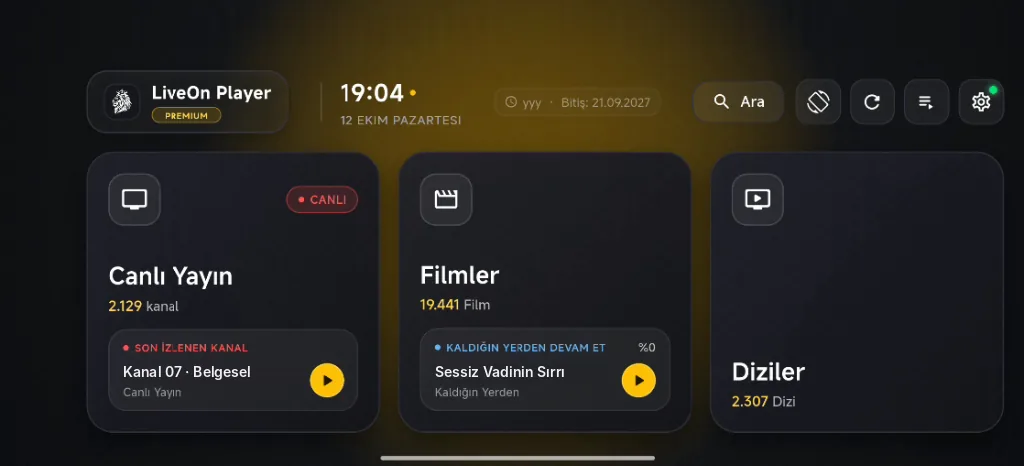
Designed for Portrait and Landscape Use
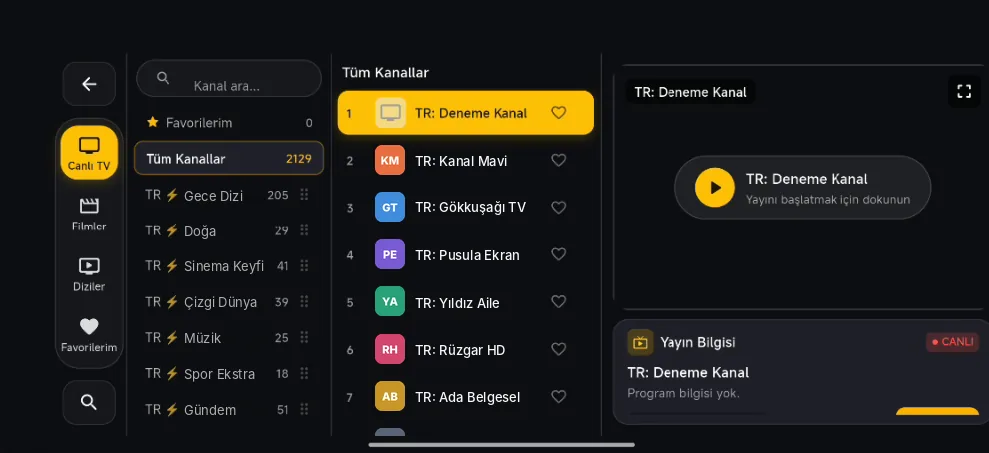
Live Stream List and Preview
Browse the streams in your own list by category, mark your favorites and start them with a single tap from the preview window.
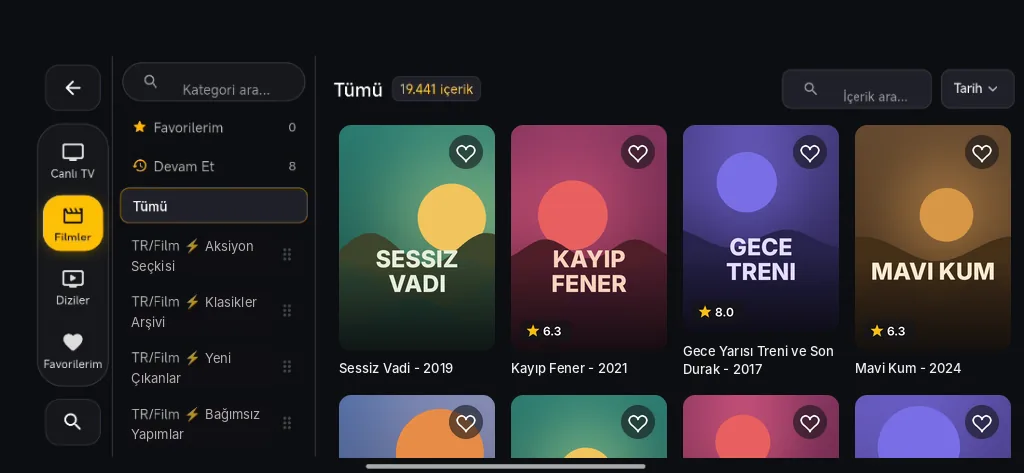
Library, Search and Sorting
Sort the videos in your list by category, date and rating; return to where you left off with "Continue".
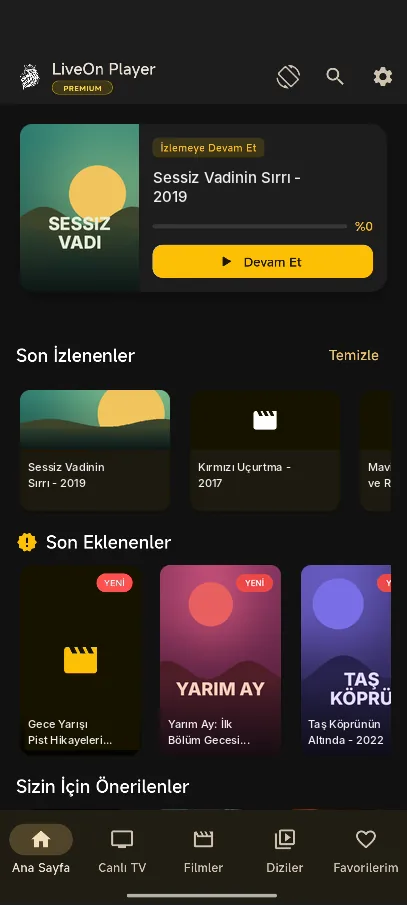
Mobile Home Screen
Continue watching card, recently watched and recently added in one screen.
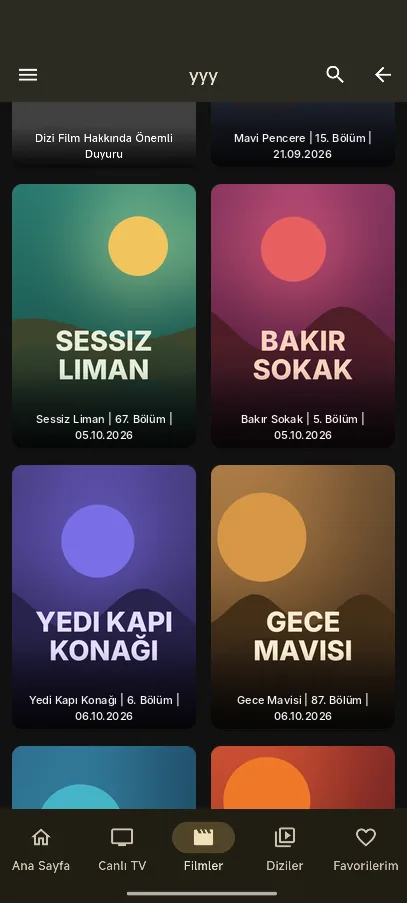
Episode View
Easily browse the episodes in your list with a large cover grid.
About the Screenshots
The images above are illustrative examples prepared solely to introduce the app interface.
- The channel, movie and series names, posters, ratings, episode details and content counts shown in the images are entirely fictional sample data; they have no connection to any real broadcaster, work, person or brand.
- LiveOn Player does not provide, host, sell or distribute any channels, movies, series or copyrighted content. The app does not come with any content list or subscription.
- The app only plays playlists and links added by the user. Holding the legal right to use this content and complying with copyright is entirely the user's responsibility.
- LiveOn Player is not affiliated with, or endorsed by, any content provider, broadcaster or platform.
Player Capabilities
Tap a feature to see its details.
Playlist Support
Add your own M3U link or Xtream login details (server, username, password) and load your list in seconds.
Multiple Playlists
Add several playlists and switch between them with a single tap.
Automatic Playlist Updates
Your playlists refresh automatically in the background at the interval you choose; newly added content arrives in your list.
Continue Watching
Your viewing progress is saved. Resume from the exact minute you left off with one tap from the "Continue Watching" card on the home screen.
Auto-Play Next Episode
When an episode ends, the next one starts after a short countdown. You can turn this off in settings.
Skip Intro
Mark a series' opening credits and skip them with one tap in the following episodes.
Quick Channel Switching
Swipe left or right in the player to jump instantly to the previous or next stream in the list.
Gesture Controls
Swipe on one side of the screen to adjust brightness and on the other to adjust volume. Double-tap to seek, press and hold to speed up the video.
Screen Lock
Lock the screen with one tap to prevent accidental touches while watching.
Aspect Ratio
Fit the video to the screen, zoom it to fill the screen or stretch it.
Subtitle Settings
Adjust subtitle size and color to suit your reading preferences.
Sleep Timer
Playback stops automatically when the time you set runs out, so the video does not keep playing while you sleep.
Smooth Playback Engine
With hardware acceleration and smart reconnection, your media streams play smoothly without stuttering.
Smart Search
Search channels, movies and series in one place. Capitalization, special characters, punctuation and spacing differences are ignored; small typos are tolerated and results are sorted by relevance.
Favorites
Add the channels, movies and series you watch often to your favorites and reach them quickly from "My Favorites".
Recently Watched
Your recently watched content is listed on the home screen and in live stream categories; you can clear your history at any time.
Category Sorting
Press, hold and drag categories into any order you like, so your favorites always stay at the top.
Hide Categories and Content
Hide categories or individual items you are not interested in and bring them back anytime from the hidden items screen.
Parental Lock
Lock selected categories with a PIN code; the PIN is required to open locked content.
Locked Content Privacy
Content watched from locked categories does not appear in your watch history or on the home screen.
Phone and Tablet Ready
A clean, intuitive interface designed especially for touchscreen phones and tablets.
Portrait and Landscape Interface
When you rotate your device, the app switches to a landscape interface made for wide screens. You choose which interface to use at startup.
Theme Choice
Choose between the Gold and Midnight Purple themes to match your style.
11 Languages
Turkish, English, German, French, Spanish, Portuguese, Russian, Arabic, Hindi, Indonesian and Chinese.
Lite Mode
On low-end devices, animations and visual load are reduced so the app runs faster and smoother.
Premium Membership
Unlock extra features and use the app ad-free with a Premium membership.
Secure & Independent
Your data and playlists are safe. The app only plays the sources you add, on your own device.
Your Playlists Belong to You
LiveOn Player does not collect its users' playlists. Your playlist links, login details and the channel and content lists inside them are stored only on your own device and are never sent to our servers.
Stays only on your device
- Your playlist links (M3U and Xtream)
- Your playlist login details (server, username, password)
- The channel, movie and series catalog in your list
- If you use the app without an account: all your settings and watch history
Stored in your account only if you sign in
- Your app preferences (theme, language, display mode, player settings)
- Your category order and the categories you hide or lock
- Your favorites, watch history and resume points
- Your parental lock PIN (encrypted)
This information is kept only to make things easier for you: when you sign in on a new device, your settings and layout come with you, so you don't have to set everything up again.
Important Legal Notice
LiveOn Player is media player software. The app does not contain, host, sell or distribute any TV broadcasts, movies, series, radio or any other copyrighted media content.
Users accept and undertake that they personally hold the copyrights and legal usage permissions for all playlists, links and content they add to the app. LiveOn Player cannot be held responsible under any circumstances for the content users play.
Common Questions
Does LiveOn Player provide channels or content?
No. LiveOn Player is only a media player; it does not include or sell any channels, movies, series, playlists or subscriptions. The app plays only playlists you add yourself from a provider you are legally entitled to use.
How do I add my M3U or Xtream Codes playlist?
In the app, open Playlists and tap "Add Playlist". For M3U, paste the link from your provider; for Xtream Codes, enter the server address, username and password. Your list loads in a few seconds.
Where are my playlists and passwords stored?
Only on your own device. Your playlist links and login details are never sent to our servers. If you sign in, only your app preferences, category layout, favorites and watch history are kept in your account — and these contain no playlist links or passwords.
Is the app paid, and what does Premium offer?
Downloading and using the app is free. The optional Premium membership (monthly, yearly or lifetime) removes ads and unlocks extra features. Purchases are made through the app store.
Which devices does it run on?
It runs on phones and tablets with Android 7.0 or later. The app offers separately designed interfaces for both portrait and landscape use.
Do I need to create an account?
No. You can use the app without an account; in that case all your settings stay only on your device. If you sign in with email or Google, you can carry your settings and layout to your other devices.
About Us
LiveOn Player is an independent media player developed by the LiveOn Player Team for people who want to watch their own playlists in an organized and comfortable way.
Support & Contact
For questions, suggestions and support requests, you can reach us by email.
destek@liveonplayer.xyzDownload LiveOn Player
Download the latest version for your phone or tablet and start playing your own playlists right away.